In today's online society, we are accustomed to using the internet on a daily basis.
Many people rely on their smartphones both for searching for shops they wish to visit and for actually going to them.
Whilst in Japan, you can comfortably use the internet via 4G or LTE communications.
However, once you go abroad, you will be unable to make calls.
Today, I would like to share three ways to use the internet for those travelling to Sri Lanka.
Free Wi-Fi is available at major facilities such as airports, but...
In Japan too, the number of places offering free Wi-Fi at airports and cafés has been increasing.
Sri Lanka also has locations where free Wi-Fi is available, including Colombo's Bandaranaike International Airport and major bus terminals.
However, if you consider the matter calmly, even in Japan, it cannot be said that Wi-Fi coverage is fully established.
The likelihood of finding Wi-Fi available nearby when you wish to use it in Sri Lanka is extremely low.
If you wish to secure an internet connection, we recommend considering the two methods outlined below.
Make the most of Sri Lanka's budget SIM cards
For those who wish to use the internet anywhere, a SIM card is recommended.
By inserting a locally purchased SIM card into your mobile phone, you can use the internet just as you would in Japan.
SIM cards in Sri Lanka are far cheaper than in Japan
In Sri Lanka, you can use SIM cards at very low prices.
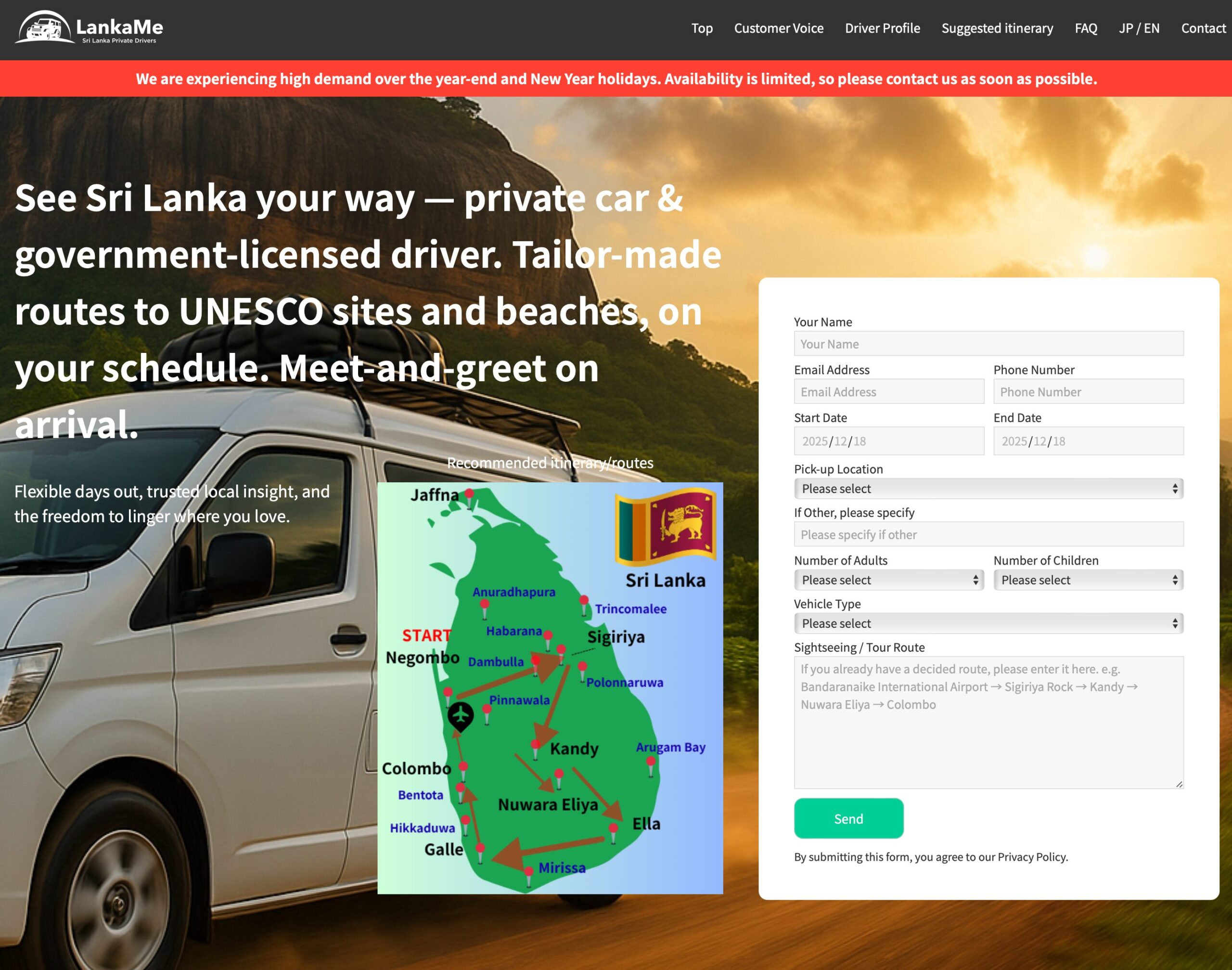
I shall introduce information about 'Lanka Me', a taxi charter company I used.

Regarding the Wi-Fi environment,
It is common practice to purchase a SIM card. At Colombo Airport, Dialog's SIM card offers 【4GB・4G・
【Data only, no calls】650 LKR (400 yen) Available for purchase. ※
This service cannot be used on mobile phones from major domestic carriers that have not had their SIM locks removed. Please be advised that this is not the case. (→ The author will explain this point in detail later on!) Incidentally, the going rate in Sri Lankan towns is just 150 rupees (approximately 90 yen) for the SIM card itself, with data costing 100 rupees (approximately 60 yen) per megabyte – making it extremely affordable to use.
1 Sri Lankan rupee is approximately 0.6 yen.
In other words, you can use Dialog's 4GB plan at the airport for approximately £3.50.
For those wishing to utilise even greater data allowances, one option is to purchase a 10MB SIM card with the assistance of a driver in town.
The actual price when the author purchased a SIM card with the help of a Lanka Me driver is as follows.
SIM card fee: 150 Sri Lankan rupees (includes 1.5GB free)
Fee: 100 Sri Lankan rupees
Data allowance: Depends on desired GB amount. In the author's case, 17.5GB for 949 Sri Lankan rupees.
Total: 1,199 Sri Lankan rupees (approximately ¥700)
For £7 you get 19GB. With Japan's major carriers, using that much data would cost nearly £100, wouldn't it?
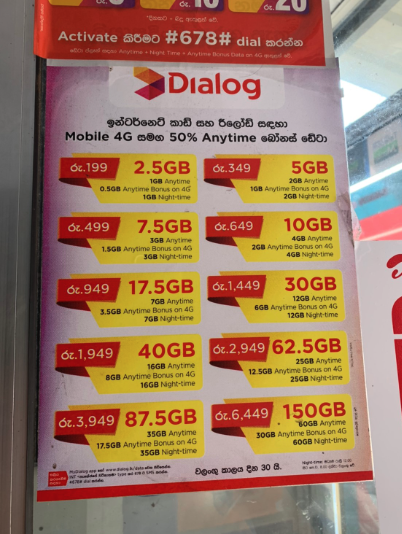
Compared to Japanese telecommunications companies, it's incredibly cheap.
I'm amazed at how cheap things are in Sri Lanka.
However, you will need to configure the settings to use the SIM card, so I shall explain how to do this.
Ensure all prior settings are completed whilst in Japan, so that upon arrival, you need only swap out the SIM card.
How to Unlock Your SIM - Settings in Japan Can Be Completed Online -
As I use Docomo, I would like to explain the SIM unlocking method for Docomo.
SoftBank and au customers can also easily unlock their SIM cards; please see below.
→ SoftBank SIM unlocking
→ AU SIM unlock
The procedure is almost identical for all three carriers: simply navigate to your My Page and complete a straightforward process taking around two minutes.
For those with AU and SoftBank, the following video also provides an explanation, so please refer to it if you wish.
【Unlocking your SIM in Australia】
【Unlocking your SIM with SoftBank】(The procedure is the same for models other than the iPhone 7)
I digress, but Docomo is 'Docomo SIM unlockingFollow the instructions to actually unlock it.
You can have the SIM lock removed at any Docomo, SoftBank or AU store.
However, as there are fees involved and it's a waste of time, let's just cancel it ourselves!
Incidentally, it was so simple it took a mere two minutes to complete.I did.
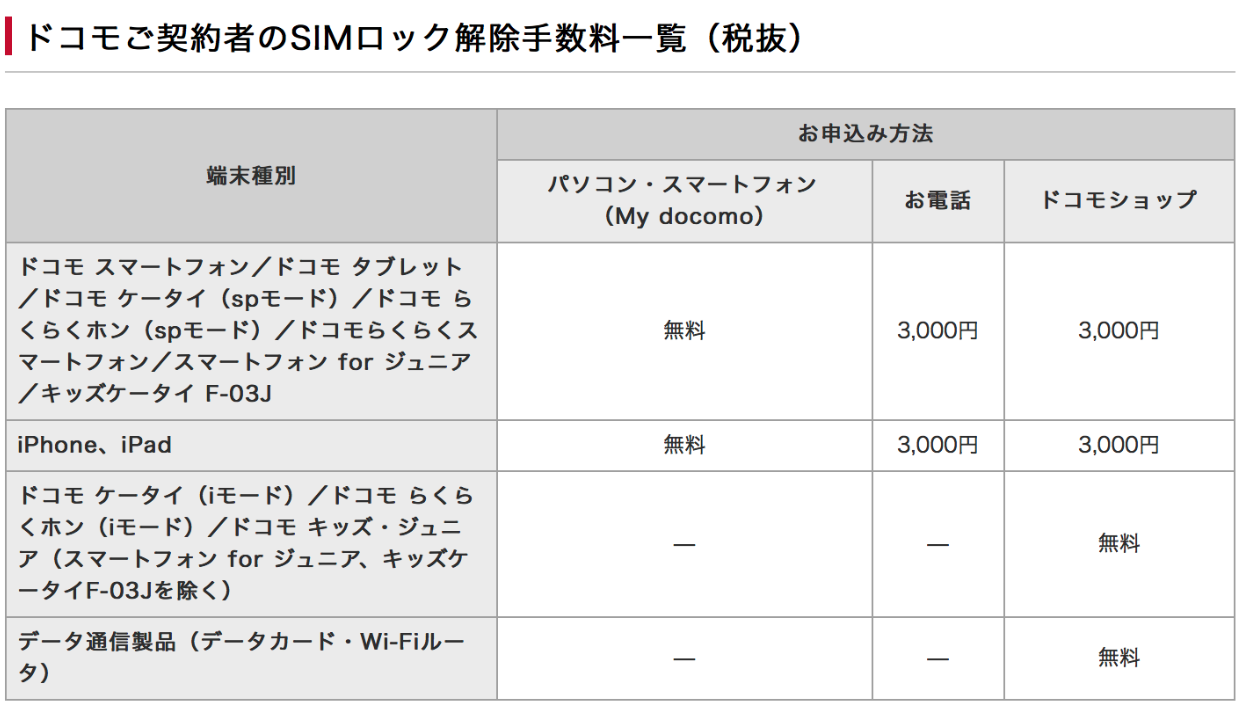
Incidentally, with Docomo, a fee of ¥3,000 applies if you do it in-store or over the phone.
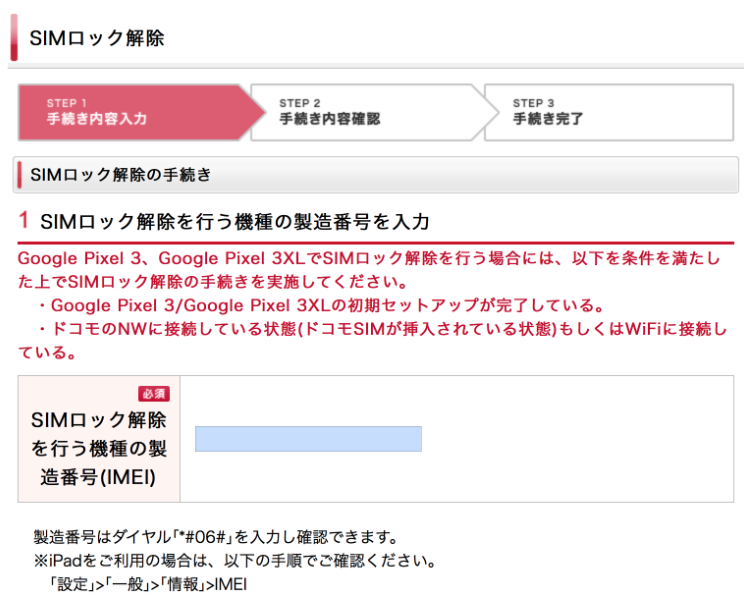
First, log in to your d account to configure the settings.
→ To your d account (SIM unlock screen)
Upon entering your ID and password, the following screen will appear. (If you have forgotten your ID and password,this)
I don't know the serial number!
If you thought that, you are rather normal.
However, you can easily check this by pressing *#06# on the telephone.
Scroll down to display the consent screen.
The 'I agree to the SIM unlocking precautions' checkbox at the bottom is designed such that it cannot be ticked unless the 'SIM unlocking precautions' directly above it have been read.
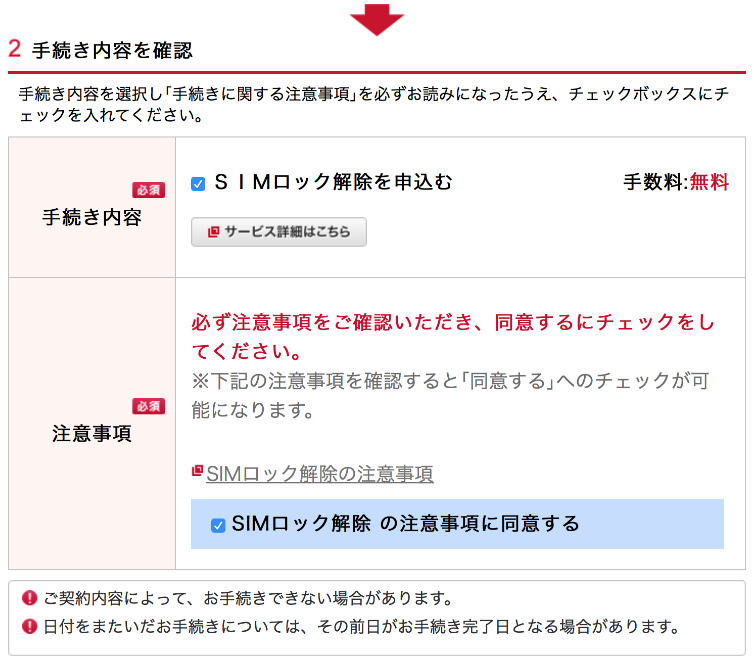
Scroll further down.
Select the email you wish to send and press 'Next'.
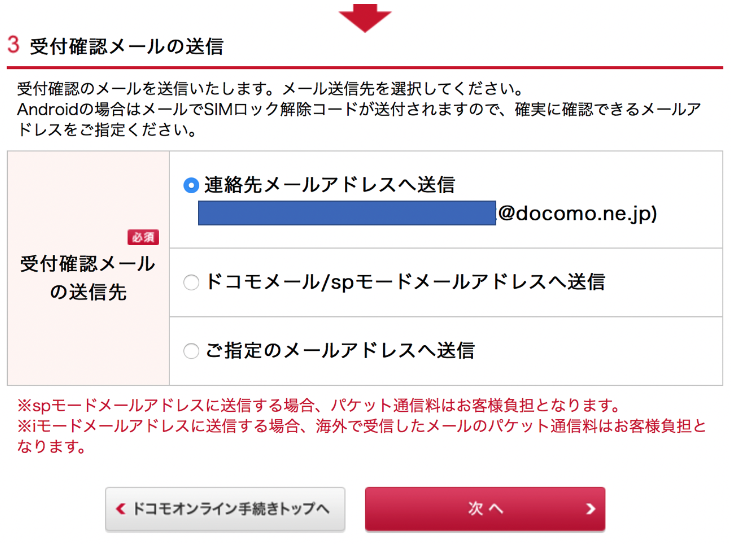
After pressing 'Next', clicking the confirmation button successfully completed the procedure.
you can receive an email stating that.
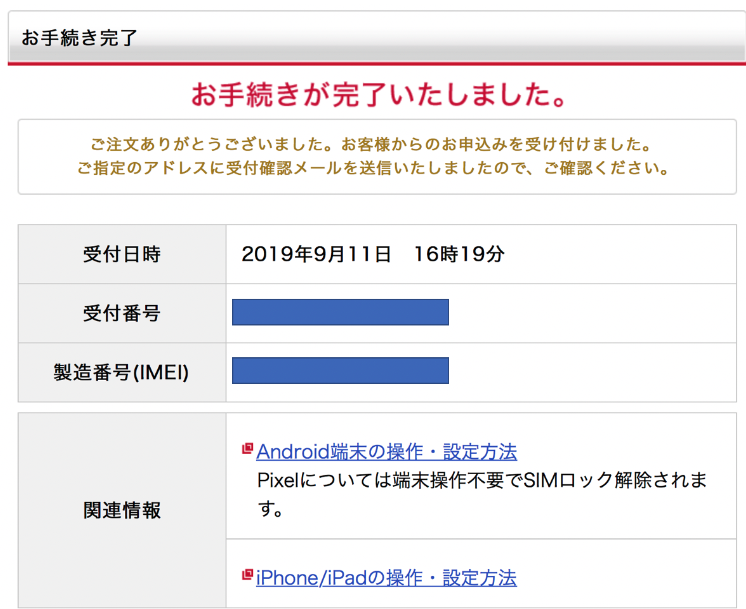
Once your application is complete, all that remains is to insert the SIM card into your iPhone.
Replace your SIM card at Sri Lanka's airport or in the city
Once the above application is complete, all that remains is to swap the SIM card.
If you watch the video below, I believe it will be easier to understand, including the previous points.
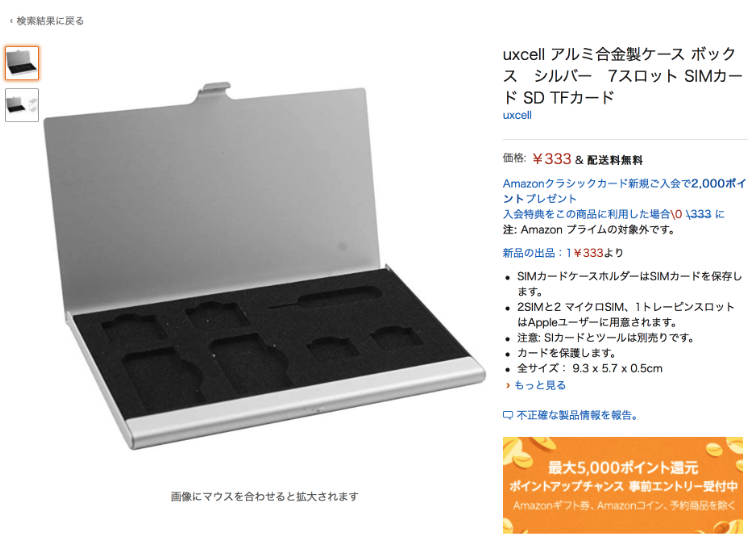
I'd better buy a SIM card storage case!
The original SIM card that was removed must be kept in a safe place.
Please note that if you lose it, you will be unable to use it after returning to Japan.
It would be prudent to purchase a case for storing your SIM card.
The author has purchased the following cases.
If you need a high-capacity internet connection, consider a pocket Wi-Fi.
Those wishing to bring their PC to Sri Lanka for work will find tethering via a SIM card insufficient.
For those wishing to use large amounts of data, we recommend the option of a pocket Wi-Fi.
Incidentally, as I also use a PC for work in Sri Lanka, I decided to bring a pocket Wi-Fi device with me.
I collected it at Narita Airport and was able to use it during my travels, just as I would in Japan.
Naturally, it's unavoidable that the price will be higher compared to a SIM card.
After comparing the following providers, I opted for Global WiFi as it was the most affordable.
The Global WiFi service used by the author
→ Global WiFi's official website
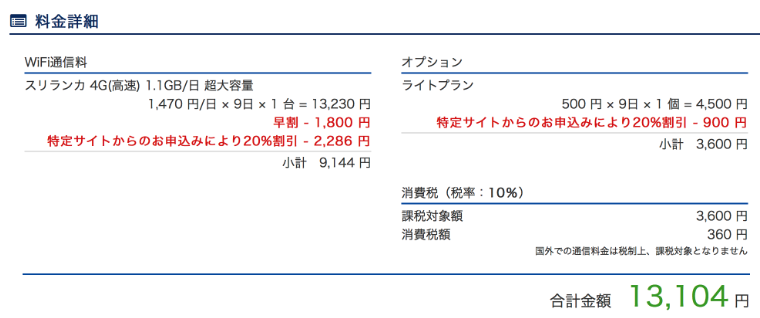
I signed up for an ultra-high-capacity plan of 1.1GB per day for 9 days, which came to ¥13,104 for the entire period at ¥1,470 per day including the guarantee.
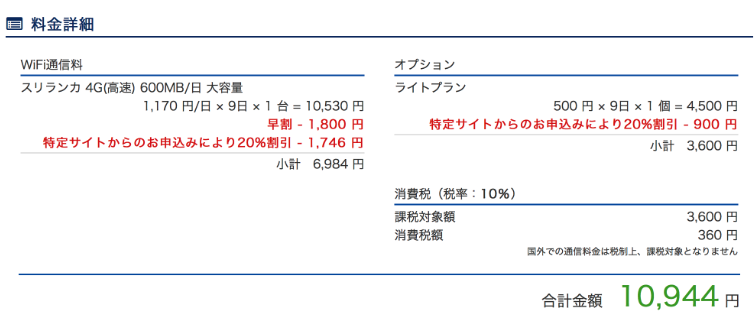
The high-capacity 600MB-per-day plan costs ¥10,944, which is ¥3,000 cheaper.
Imoto Wi-Fi, the talk of the town in commercials
→ Imoto WiFi's official website
When searching under the same conditions, the amount exceeded ¥17,000 on a guaranteed basis.
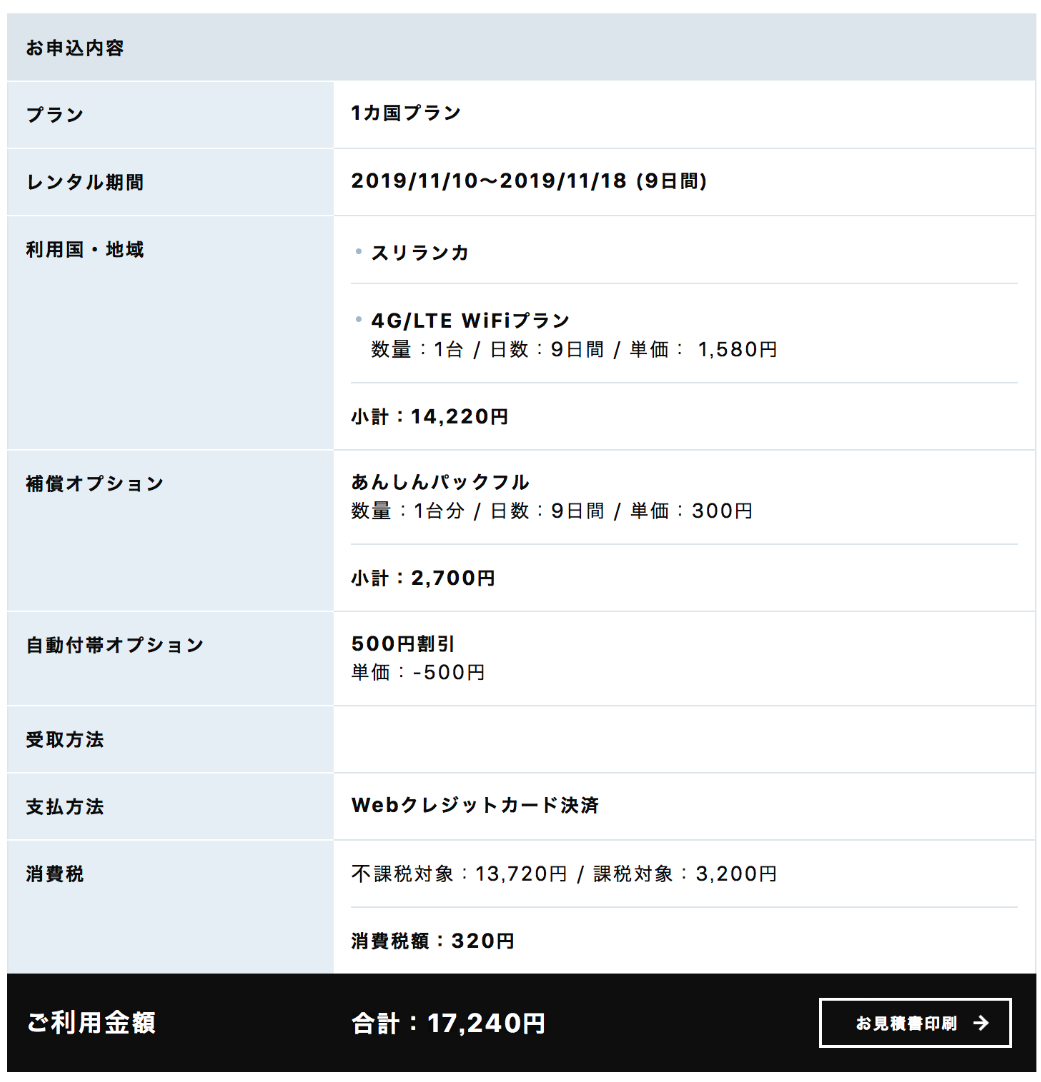
I opted for Global WiFi as I wanted to keep costs as low as possible.
For details on collecting your Global Wi-Fi device and simple setup instructions, please refer to the information below!
Summary
It is not advisable to expect free Wi-Fi in Sri Lankan towns.
For those wishing to use a mobile phone, local budget SIM cards present an attractive option.
For those wishing to use a PC for work or similar purposes, pocket Wi-Fi collected at Japanese airports may be a somewhat expensive but practical option.
For information on other flight tickets, hotels, and visa application procedures, please also refer to the following content!